This summer’s #CrossBorderRail Finale tour was the first I did without using Komoot as my bike mapping tool. Read the post I wrote before the tour for the background as to why I wanted to switch.
Now after having been using Mapy.com as my alternative for more than 1000km of bike routes in some far flung corners of Europe, what is the conclusion?
In short: it’s fantastic, I will continue using it, but it does have a couple of shortcomings.
My main phone is an iPhone 13, the secondary phone used on the bike handlebars is a iPhone 6s, and my computer a MacBook Air, with Vivaldi as my browser. That is the combination used for the tests.
I will review how Mapy performs according to the criteria I set ahead of the trip:
Essential
1) Ability to plan and save bike tour routes on both a regular web browser on a computer, and on an iPhone, and save and sync these. These routes can be anything from “get me to that hotel right now” to “route me via 7 different very specific via points”
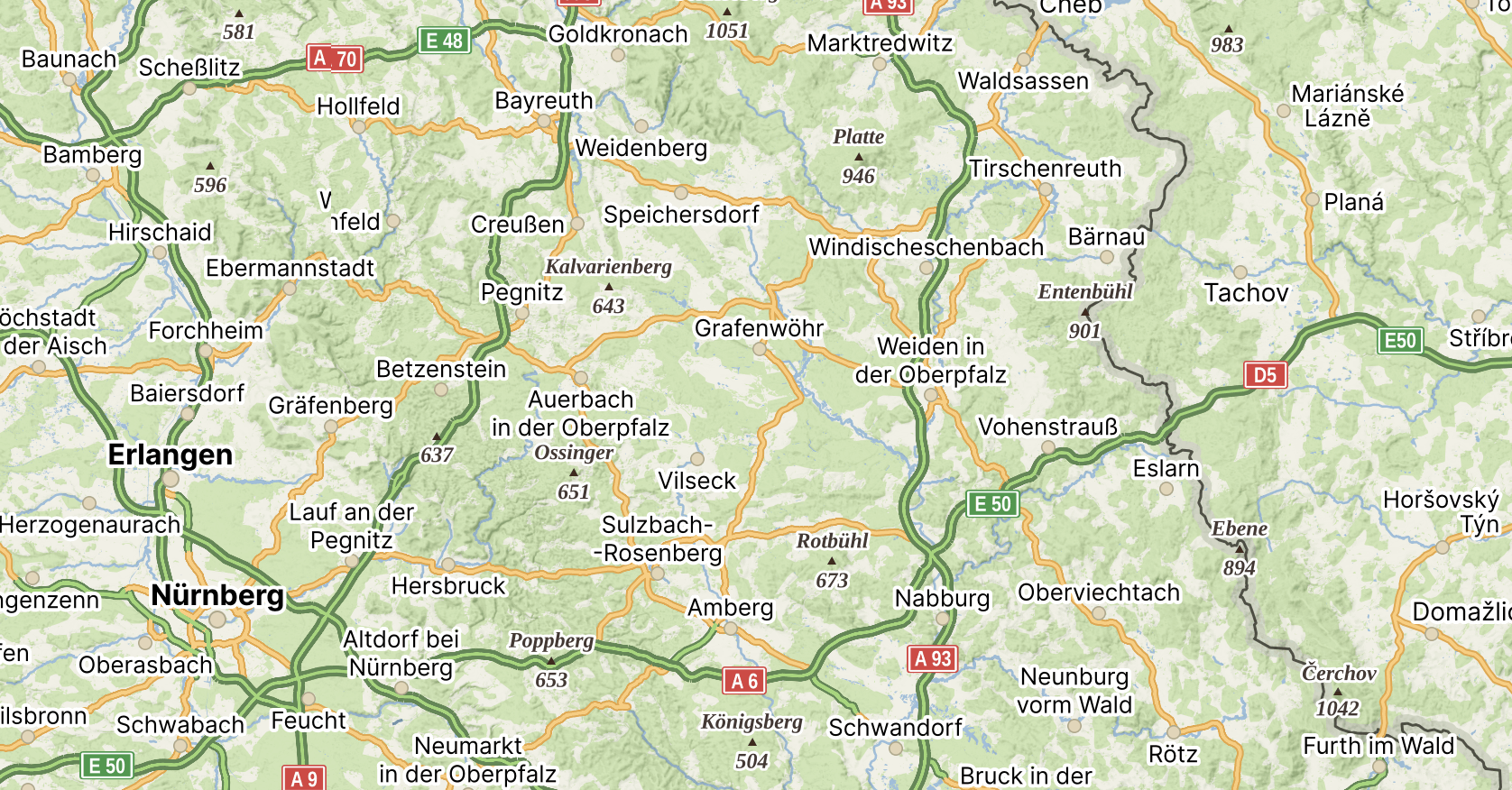
This works superbly well. Planning especially in the web browser is a breeze, and saving and organising saved routes and saved locations, and organising them into folders is simple and straightforward. An additional bonus is I find the way the maps display to be very elegant – they remind me of the maps I used in my youth to navigate walking trips in the Brecon Beacons! The only shortcoming is ad hoc search is not as good as Google’s.
2) Altitude for routes
Simple toggle on-off for this in web and iPhone app – fine.
3) Turn by turn navigation that works on an iPhone
Works fine visually, although following a dotted line does take a bit of getting used to.
4) GPX or GEOjson data import and export
GPX import and export, but with one minor shortcoming – imported GPX files cannot be turned into turn-by-turn navigation, they only display. But given I switched to planning with Mapy, this is no longer an issue. GPX exports from Mapy display fine in umap, and amending routes is excellent – you are offered the choice to overwrite an existing route, or save the new one in addition.
Ideal
1) OpenStreetMap as the underlying map
Yes, and elegantly rendered. Contours on the map are nice to have too. Excellent.
2) Opportunity to also plan walking and car routes in the same tool (allowing me to get rid of a few odd uses of Google Maps as well while I am at it!)
Yes, this works well – walking and car routes are excellent. There is just one catch – search in Mapy is not great, especially if you partially mis-spell a road name. Google handles these issues much better than Mapy does. So I had to keep Google Maps on my phone for these moments.
3) Some data efficient system, ideally offline maps and even offline navigation to save me when my data is low or mobile phone signal non-existent in odd corners of Europe
I am using the Mapy.com Premium plan which is €18,99 and this gives you unlimited maps to download to your phone for use offline and it even routes you properly if you have no internet connection! That was amazingly good. There is a tiny glitch that sometimes maps don’t show properly when you cross from one country into another (even if you have both countries downloaded), but this was easily overcome with a short internet connection. Overall: better than expected.
What did not matter
1) Public transport data (I have loads of other apps for that)
No idea – did not test this.
2) Having to pay a bit of money for the app, or not
€18,99 a year for all of this is a fair price – it’s good value I think!
3) Off-road or gravel bike routing don’t matter – the most extravagant I am ever going to need is a non-paved track
There are five bike options in the iOS app – bicycle touring (was my default), mountain bike, road bike (I sometimes used to make sure I didn’t end up on too many unpaved surfaces), gravel, and footbike. These provided plenty enough detail for my purposes. However the older app version on iOS 15 on the iPhone 6s I used on the handlebar mount has only mountain bike and road bike – I could live with as routes planned elsewhere worked correctly, but if you need really granular control this could be a constraint.
4) The quality of audio instructions when using turn-by-turn (I am mostly using the visual instructions)
Again I did not test this – I was only using visual navigation.
Other considerations
1) Routing quality
This is a tricky one, as I have no real direct comparison. Mapy did route me along some hellish bumpy and boggy non paved lanes, but this is dependent on the quality of the OpenStreetMap data, so I doubt Komoot would have performed better. Twice it tried to route me on lanes that were fenced off in industrial areas. So not perfect, but I need to ponder this one further.
2) Battery life
The battery life on the old iPhone 6s is lousy anyway, and I always have it connected to a power bank, but my impression was Mapy uses battery more than Komoot, but I need to check this in a separate test. I will update this blog post once I have done that on a test route.
So, overall: this worked out amazingly well. I can easily wave Komoot goodbye, and have reduced my use of Google Maps a good bit as well (although its better search means I still need it occasionally). I am happy with that outcome!


Great review which agrees with all opinions of a proud Czech user, including the misspelling intolerance and other things. Your conclusions are even more impartial because you probably haven’t made a hike to Ještěd with the owner Lukačovič lol and you have to pay for premium while the excited explorers like me get it for thousands of pictures, click at my hyperlink, wherever it is. Also, my 4982 km of completed hikes are drawn at https://mapy.com/s/pecagabagu
The posting of pictures should become a hobby of an international community. Only when the local pics made by locals outnumber those from Czech tourists going abroad there, one may say that the app started to cross the borders.
Going to Ještěd is on my long list of places I would like to visit! But I did not manage it yet! 😀